




If you run a small business in Surrey and you are not showing up on Google Maps, you are quietly handing customers to your competitors every single day. The good news is that fixing this does not require a big budget or a technical background. It starts with one free tool: your Google Business Profile.
This Google Business Profile checklist for small businesses in Surrey will walk you through exactly what to update, what to check, and what most local businesses get completely wrong. Follow these steps and you will give your business the best possible chance of showing up when someone nearby searches for your service.
Why Your Google Business Profile Matters for Local SEO in Surrey
Before we get into the checklist, it helps to understand why this matters so much. When someone in Guildford types “plumber near me” or someone in Woking searches for “best café nearby,” Google shows them a map with three local businesses at the very top of the page. This is called the Local Pack, and it appears before any organic results.
If your business is not in that top three, most people will never scroll down to find you. That means your competitors are getting calls that should be yours. A well-optimised Google Business Profile is the single most important thing you can do for local SEO in Surrey, and it costs absolutely nothing to set up.
The Google Business Profile Checklist for Small Businesses in Surrey
Work through each section below and tick off what you have already done. Anything you have not done yet is costing you visibility.
1. Claim and Verify Your Profile
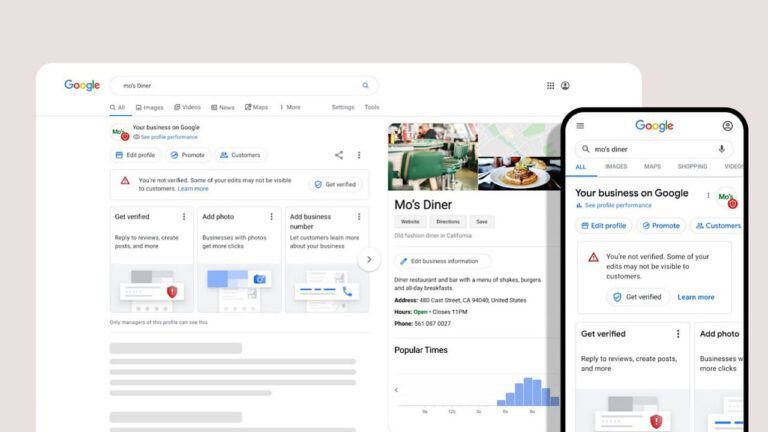
This sounds obvious, but a surprising number of Surrey businesses have never claimed their Google Business Profile. Search for your business name on Google Maps. If you see a listing that says “Own this business?”, click it and follow the verification steps. Google will usually send a postcard to your address with a code. Once verified, you have full control over how your business appears in local search results.
2. Choose the Right Business Category
Your primary category tells Google exactly what kind of business you are. If you are a dentist in Reigate, choose “Dentist” not “Healthcare Provider.” Be as specific as possible. You can also add secondary categories, so if you are a café that also does catering, add both. Getting this right is a fundamental part of the Google Business Profile checklist for small businesses in Surrey because it directly affects which searches your profile appears in.
3. Add Your Full Business Information
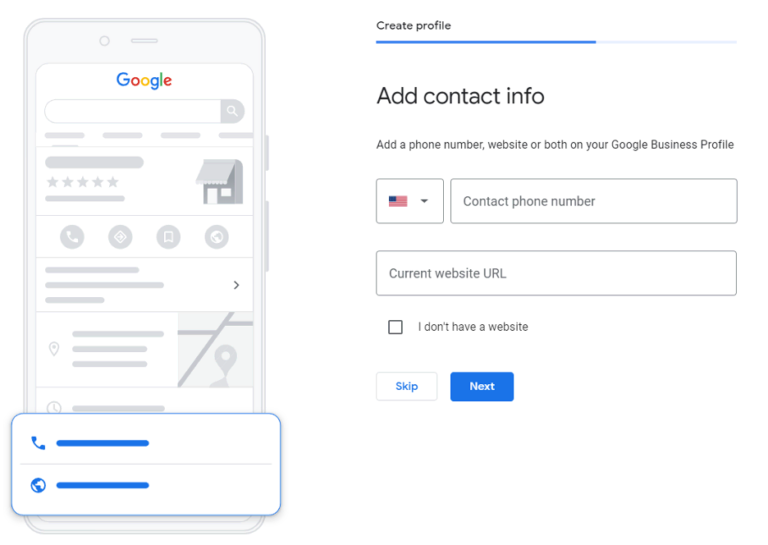
Fill in every single field Google gives you. This includes:
- Your business name exactly as it appears everywhere else online.
- Your full address including postcode.
- Your primary phone number.
- Your website URL.
- Your opening hours including any special holiday hours.
- A link to your booking page if you take appointments.
Consistency is crucial here. If your address appears differently across your website, social media, and Google, it can confuse the search engine and hurt your local SEO in Surrey rankings.
4. Write a Clear and Helpful Business Description
You have 750 characters to tell people what your business does and why they should choose you. Write this in plain, simple English. Mention your main service, your location in Surrey, and what makes you different. Avoid stuffing it with keywords. Google can tell when you are writing for a robot rather than a person, and so can your potential customers.
5. Upload Real, High Quality Photos
Businesses with photos receive significantly more clicks and direction requests than those without. Add photos of your shopfront or office so people can recognise it. Add photos of your team, your products, or your completed work. Update them regularly. Avoid stock images because they look fake and people can tell immediately.
6. Collect and Respond to Reviews
Businesses with photos receive significantly more clicks and direction requests than those without. Add photos of your shopfront or office so people can recognise it. Add photos of your team, your products, or your completed work. Update them regularly. Avoid stock images because they look fake and people can tell immediately.
7. Use the Posts Feature Regularly
Most Surrey businesses set up their profile and then never touch it again. Google lets you publish posts directly on your profile, similar to social media updates. Use this to share news, offers, new services, or helpful tips. These posts appear on your profile and show Google that your business is active and relevant. Posting once a week is more than enough to make a difference.
8. Add Your Services and Products
If Google gives you the option to list your services or products, use it. Add every service you offer along with a short description and a price range if possible. This helps your profile appear in more specific searches and gives potential customers more information before they even visit your website.
9. Set Up Your Messaging and Booking Features
Google allows customers to send you a message directly from your profile. Enable this feature and make sure you respond quickly. You can also add a booking button that links directly to your appointment system. The easier you make it for someone to contact you, the more likely they are to choose you over a competitor.
10. Check Your Profile for Errors Regularly
Your Google Business Profile is not a one-time job. Check it at least once a month. Google sometimes allows third parties to suggest edits to your profile, and these can go live without you noticing. Check that your opening hours are still correct, your photos are current, and your contact details have not changed. Keeping your profile accurate is a small task that protects your local SEO in Surrey over the long term.
Common Mistakes Surrey Businesses Make with Their Google Business Profile
Even after completing the Google Business Profile checklist for small businesses in Surrey, many businesses still make a few common errors that hold them back.
- Inconsistent business name across platforms: If your business is called “Smith and Sons Plumbing” on Google but “Smith Plumbing Ltd” on your website, Google gets confused and your local rankings suffer.
- Ignoring negative reviews: A single unanswered one-star review can put off dozens of potential customers. Responding shows that you care about your reputation and you are a professional operation.
Old or missing photos: Fresh, recent photos signal to Google that your business is active, which helps your profile rank higher in local searches across Surrey.
How to Track Whether Your Profile is Working
Google Business Profile includes a built-in analytics section called Insights. This shows you how many people searched for your business, how many viewed your profile, and how many clicked to call you or ask for directions. Check this once a month and look for trends. If you are getting lots of profile views but very few calls, your profile might need a stronger description or more reviews to convince people to take the next step.

Get More Local Leads with a Free Marketing Audit
Getting your Google Business Profile checklist for small businesses in Surrey right is a brilliant first step, but it is just one part of a strong local SEO strategy. If you want to understand the full picture of how your business appears online, including your website speed, your ad campaigns, and your overall search visibility across Surrey, we can help.
Maximus Mediascape is currently offering a free marketing audit for local businesses in Surrey. We will review your Google Business Profile, your website, and your current digital marketing and send you a clear, practical report showing exactly where to focus your energy.
Visit our digital marketing agency in Surrey page to claim your free audit today.
Frequently asked questions about Google Business Profile in Surrey
A Google Business Profile is a free listing that controls how your business appears on Google Maps and in local search results. For Surrey businesses, it is often the first thing a potential customer sees before visiting your website. Without a complete and accurate profile, you are making it harder for local people to find and choose your business over a competitor who has theirs properly set up.
The initial setup usually takes around 30 to 60 minutes if you have your business information ready. Verification can take a few days if Google sends a postcard to your address. However, optimising your profile fully, adding photos, collecting reviews, and writing a strong description is an ongoing process that pays off steadily over time for your local SEO in Surrey.
The Local Pack shows the top three local businesses for a search. To improve your chances of appearing there, complete every section of your Google Business Profile, choose the most accurate business category, collect genuine reviews regularly, and keep your contact details consistent across your website and social media. Strong local SEO in Surrey also depends on having relevant content on your website that matches what people search for locally.
There is no fixed number, but consistency and recency matter more than volume. A business with 15 recent reviews will often outrank one with 50 old reviews. Focus on asking happy customers for a review after every job or appointment. Even a steady flow of two or three new reviews each month can make a significant difference to your Google Business Profile visibility in Surrey.
Yes. If you operate as a service area business, for example a plumber or a cleaner who visits customers rather than having a shopfront, you can hide your address and instead list the towns and postcodes you cover across Surrey. This still allows you to appear in local searches for those areas. Just make sure your service area is set up accurately so Google knows where to show your listing.
We recommend checking your profile at least once a month. Update your opening hours for bank holidays and special occasions. Add a new post once a week if possible. Upload fresh photos every couple of months. Google rewards active profiles with better visibility, so regular updates are a simple and free way to improve your local SEO in Surrey without any technical knowledge.
Yes. As part of our free marketing audit for Surrey businesses, we review your Google Business Profile alongside your website and any current ad campaigns. We identify what is missing, what is outdated, and what quick fixes will have the biggest impact on your local visibility. Visit our digital marketing agency in Surrey page to claim your free audit and start getting more local enquiries.
