Role Prompting and Prompt Length: What Actually Helps
Does telling AI to act as an expert help? How long should a prompt be, and how many questions can you ask at once? A practical guide to what works.

By Maximus Mediascape
TLDR
Ten common AI prompting mistakes, why each one gives weak answers, and the fix. Covers vague asks, missing context, conflicting rules and unchecked facts.
Ask AI to summarise
You ask AI to write an email, summarise a report or help you plan something for your business. The response comes back quickly, but it is not quite what you needed.
It might be too generic. It might miss an important part of your request. It might use the wrong tone or make assumptions about your business. Sometimes, it may even give you information that sounds convincing but needs checking.
It is easy to assume the AI tool is the problem.
Sometimes it is. But often, the issue is the instructions you gave it.
A prompt can be too vague, contain conflicting requirements, leave out important information or ask AI to handle too many things at once. Understanding these common AI prompting mistakes can help you work out what went wrong and what to change.
Here are 10 common mistakes to look for.
One of the easiest ways to get a generic AI response is to make a generic request.
One of the easiest ways to get a generic AI response is to make a generic request.
For example:
“Write some content for my business.”
You know what you mean. AI does not.
It does not know what the content is for, who will read it, what your business does, how long it should be or what you want the reader to do afterwards.
Give AI a clearer task and enough information to understand what you need.
The second version gives AI a much clearer job.
If you want to improve the way you structure these instructions, our guide to how to give AI clearer instructions covers the key elements that can make a prompt more useful.
Sometimes the problem is not that you have given AI too little information. You have given it instructions that compete with each other.
For example:
“Write a detailed explanation, but keep it under 100 words.”
Or:
“Make it highly professional but very casual.”
Or:
“Give me five detailed options, but keep the answer as short as possible.”
AI has to decide which instruction should take priority.
The result may not match what you had in mind.
Look through your prompt for requirements that conflict with each other.
If one requirement matters more than another, make that clear.
For example:
“Keep the response under 200 words. Prioritise the three most important points rather than trying to cover everything.”
Clear priorities give AI less room to make its own decisions.
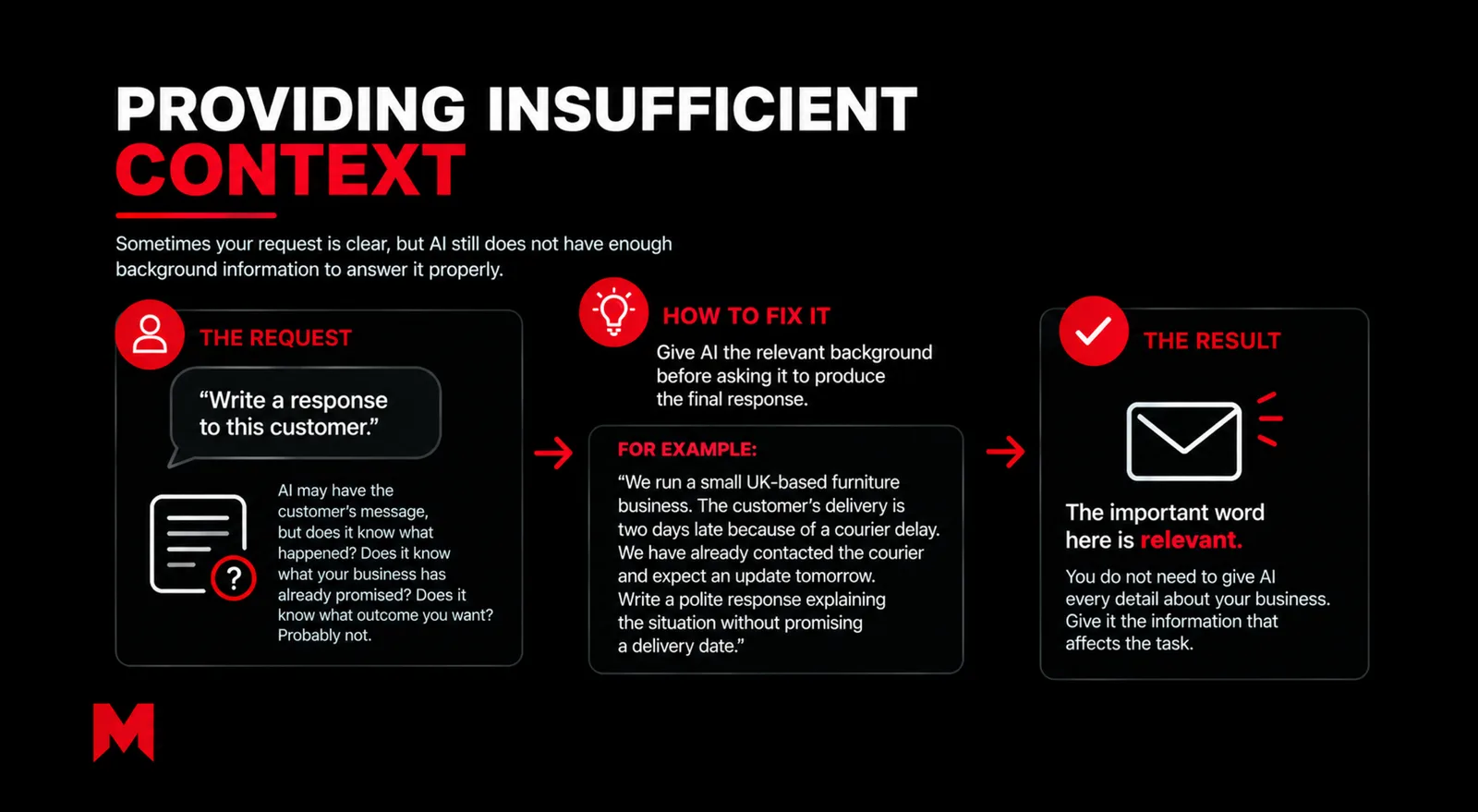
Sometimes your request is clear, but AI still does not have enough background information to answer it properly.
Consider:
“Write a response to this customer.”
AI may have the customer’s message, but does it know what happened? Does it know what your business has already promised? Does it know what outcome you want?
Probably not.
Give AI the relevant background before asking it to produce the final response.
For example:
“We run a small UK-based furniture business. The customer’s delivery is two days late because of a courier delay. We have already contacted the courier and expect an update tomorrow. Write a polite response explaining the situation without promising a delivery date.”
Now AI has something useful to work with.
The important word here is relevant. You do not need to give AI every detail about your business. Give it the information that affects the task.
A single prompt can sometimes contain several different jobs.
For example:
“Analyse our customer feedback, identify the main complaints, compare them with our competitors, suggest improvements, create a new customer service policy and write an email announcing it.”
That is not really one task. It is several.
When a prompt contains too many jobs, some requirements may receive less attention than others.
Break the work into smaller stages.
You could first ask AI to analyse the customer feedback. Once you have reviewed the findings, ask it to identify the main issues. You can then move on to possible improvements and, finally, the customer communication.
This is known as prompt decomposition, one of the AI prompting techniques covered in our guide to getting better responses from AI.
Breaking a complicated task into smaller parts also gives you more opportunities to check the information before moving forward.
A response can be perfectly accurate and still be completely wrong for the person who needs to read it.
Compare these two requests:
“Explain our new service.”
and:
“Explain our new service to a small business owner who has never used this type of service before. Keep the explanation straightforward and avoid technical language.”
The second prompt tells AI who it is speaking to.
That matters because a customer, employee, supplier and senior manager may all need different explanations of the same thing.
Tell AI who the response is for.
You can also explain what the reader already knows, what they need to understand and what you want them to do with the information.
This is particularly useful for customer emails, proposals, internal documents, website copy and explanations of technical subjects.
Sometimes AI gives you useful information, but in a format you cannot use.
You ask:
“Summarise this report.”
You wanted five bullet points for a management meeting.
AI gives you six paragraphs.
The information might be fine. The output is not.
Tell AI what you want the finished response to look like.
For example:
“Summarise this report in five bullet points. Focus on the findings that could affect our operations. Keep each point to two sentences.”
You can specify:
The clearer the output requirements, the less AI has to guess.
This is an easy mistake to make because you already know your business inside out.
You know what you sell, who your customers are, what your team can deliver, what you have already tried and what you do differently from competitors.
AI does not automatically know those things.
For example:
“Suggest five ways to improve our customer service.”
could produce fairly general suggestions.
Compare that with:
“We are a five-person UK-based service business. Most customer enquiries come through email and phone. Response times become slow during busy periods, but we are not planning to hire another full-time employee. Suggest five practical ways to improve response times.”
The second prompt gives AI information that directly affects its suggestions.
Before writing the prompt, ask yourself:
What do I know about my business that AI would need to know to answer this properly?
That could include your customers, team size, location, budget, existing systems, limitations, objectives or previous decisions.
If you regularly use AI for business tasks, it is also worth learninghow to build a prompt with the right context.
Reusable prompts can save time, but they should not be treated as something you write once and never touch again.
An old prompt may contain outdated information about your business, products, services or customers. It may also include instructions that are no longer relevant to the task.
AI tools and models can also change, so a prompt that produced a useful result previously may need adjusting for a different task or model.
Review your regular prompts from time to time.
Check:
A prompt should support the way you work now, not the way your business worked six months ago.
A response can sound confident and still contain incorrect or incomplete information.
This matters particularly when you are using AI for information that could affect a business decision.
That could include financial figures, regulations, legal requirements, statistics, product specifications, dates or industry information.
For important information, give AI reliable source material where possible and ask it to work from those sources.
Then check important claims yourself before relying on them.
For example, if you ask AI to summarise a regulation, providing the relevant document is very different from simply asking it what the regulation says.
AI can help you process information quickly, but a confident response should not automatically be treated as verified information.
You do not always need to start again when the first response is not quite right.
Sometimes, it is easier to tell AI what needs changing.
For example:
“The structure works, but the tone is too formal. Rewrite it for a small business customer and remove the first paragraph.”
You could then follow up with:
“Make it shorter and keep the second section unchanged.”
This is iterative prompting. Instead of expecting the perfect response from one instruction, you improve the result by giving AI more specific feedback.
When the response is close but not right, identify the specific problem.
Is it:
Tell AI exactly what needs to change rather than simply asking it to “try again”.
Once AI has produced an answer, you can ask it to review the result against specific requirements.
For example:
Check the response against the original requirements. Identify anything that is missing, unclear or unsupported, then provide a revised version.
You can also give it a checklist:
Before providing the final answer, check that all five requested points have been covered, the response is under 500 words and the tone is suitable for UK business owners.
This can help identify omissions and improve consistency.
However, self-critique does not replace human judgement. AI can still make mistakes when reviewing its own output, so important facts, figures and business decisions should be checked independently.
When an AI response is not useful, go back to the prompt before starting again.
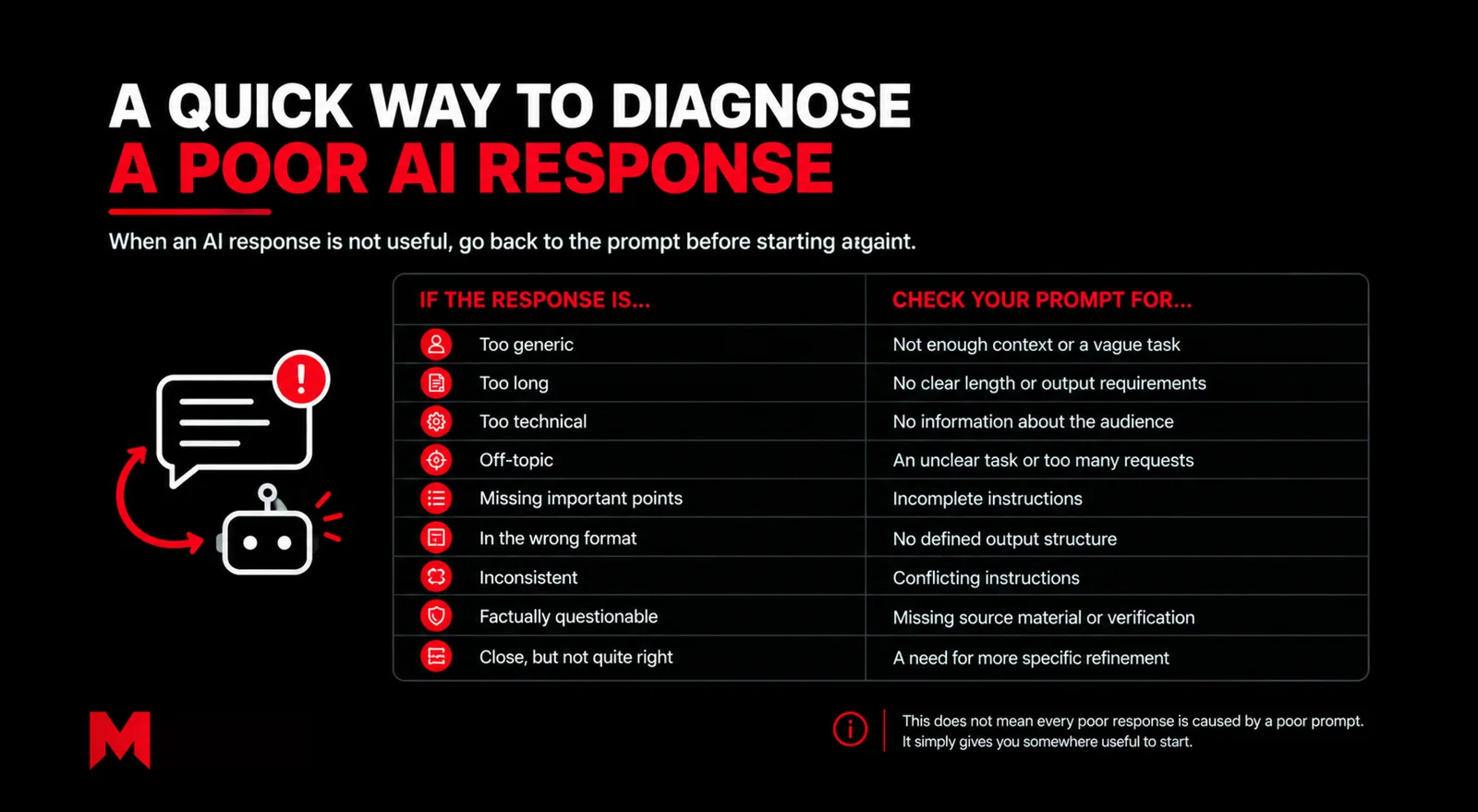
This does not mean every poor response is caused by a poor prompt. It simply gives you somewhere useful to start.
Better prompts can improve the quality and usefulness of an AI response, but they cannot guarantee that every answer will be correct.
Sometimes AI does not have the information required. Sometimes a task needs current information or access to a particular source. Sometimes the question itself is difficult or ambiguous. And sometimes the model simply gets something wrong.
That is why good prompting should go alongside sensible review.
For important business information, check the original source. For complicated tasks, break the work into stages. And when a response is close but not quite right, refine the prompt rather than assuming the tool cannot handle the task.
Before changing the AI tool or abandoning the task, work through a few simple questions:
Did I explain exactly what I want?
Did I give AI the business context it needs?
Did I explain who the response is for?
Did I define what the final answer should look like?
Am I asking for too many things at once?
Have I given conflicting instructions?
Have I checked the information AI has provided?
Could I improve the response by refining the prompt?
These questions will not solve every problem, but they can help you work out whether the issue is with the prompt, the information available or the task itself.
For some businesses, the next step is also to look beyond individual AI tasks and consider where AI could become part of everyday processes. Maximus Mediascape provides AI, automation and chatbot solutions for areas such as customer support, lead handling and business workflows.
The more useful question is not simply whether you are using AI. It is whether you are giving it enough direction to do something genuinely useful for your business.
Related guides: How to Improve an AI Response When the First Answer Misses, How to Write Effective AI Prompts: A Business Checklist, Role Prompting and Prompt Length: What Actually Helps, The Future of Work: How Human AI Collaboration is Transforming Business.
AI may give you a generic response when your prompt does not provide enough information about the task, your business, audience or desired outcome. Adding relevant context and being more specific about what you need can make the response more useful.
A useful prompt can include the task, relevant business context, the intended audience, important requirements and the format you want the response in. You do not need to include every detail about your business, only the information that affects the task.
This can happen when a prompt contains too many requirements, conflicting instructions or unclear priorities. Try simplifying the request, separating a complex task into smaller steps and making the most important requirements clear.
Give AI relevant information about your business, such as what you offer, who your customers are, your location, limitations, objectives and existing processes. Do not assume that AI automatically knows these details simply because they are obvious to you.
Yes, particularly when the information could affect an important business decision. Check facts such as figures, regulations, legal requirements, statistics, dates and product information against reliable sources before relying on them.
Instead of starting over, explain what needs to change. You can ask AI to make the response shorter, change the tone, add missing information, focus on a particular audience or use a different format. Specific feedback can help you refine the result.
No. A poor response can also result from missing information, an unsuitable AI model, outdated source material, a difficult task or an error made by the AI itself. Improving the prompt can help, but important information should still be reviewed and verified.
Want this handled for you every month? See our Care and Growth plans, start with the Starter plan, or see all our services. Curious who we are? Read about us and how we work.
Built to be quoted by AI. This page ships with the same structured data we set up for clients.

Does telling AI to act as an expert help? How long should a prompt be, and how many questions can you ask at once? A practical guide to what works.
Discover 10 AI prompting techniques for better responses. Learn how to write clearer prompts and get more useful results from AI for your business.

Ready-to-adapt AI prompt examples for business, from customer replies to marketing copy and meeting notes, with tips on why each one works.
The first AI answer is rarely the final one. Learn how to tailor an AI response with follow-up prompts, fix common misses and stop them happening again.
A practical checklist for writing effective AI prompts for real business tasks, with before-and-after examples you can follow.

New to AI? Learn what an AI prompt is, what makes a good one and the simple habits that help beginners get clearer, more useful answers.
Type what you want to be found for. We'll come back with a real plan, not a sales pitch.